Overview
The Tiny Form Tile asks for the details still missing on the record you’re looking at, and saves the answers straight back to that record. No separate edit screen, no round trip.
It’s about the fields on a record. For the records that should be linked to it, see the Missing Entity Tile.
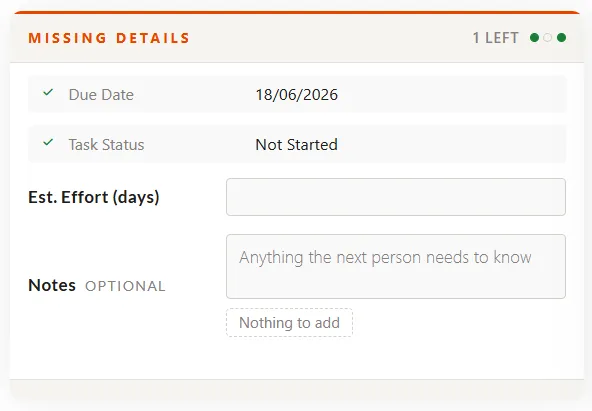
Light theme, inline layout, none emphasis. Due Date and Task Status are answered, so they’ve collapsed to ticked lines. Two boxes are still empty but the counter reads 1 LEFT — Notes is optional, so it never counts as missing.
How it behaves
- Answer a question and it collapses to a single ticked line, keeping the tile short as you work down it.
- The counter shows what’s left. Optional questions never count toward it.
- Answer everything and the tile shrinks to a read-only summary.
Example
Everything is edited as JSON on the tile’s rule, in the admin. Changes take effect after a cache clear — no deployment, no downtime.
{
  "Fields": ["ID", "TaskDueDate", "TaskEstimatedEffort", "TaskStatus", "Notes"],
  "UIProperties": {
    "EntityName": "Task",
    "FieldOverrides": {
      "TaskDueDate": { "Hint": "When this needs to be done by." },
      "Notes": { "Required": false, "Quick": ["Nothing to add"] }
    },
    "LayoutMode": "inline",
    "Theme": "light",
    "Emphasis": "none"
  },
  "StaticContent": {
    "Title": "Missing details",
    "CompleteMessage": "Nothing missing"
  }
}
The questions
| Setting | What it does |
|---|---|
Fields | The questions, asked in the order given. "ID" must come first — without it the tile can’t save. Use field names, not their captions. Adding a question is one edit: add the field name. |
EntityName | Required. The type of record being edited. It has to match the record type the rule targets. |
You don’t describe the fields themselves. Each question’s wording, the control it shows, and any drop-down options all come from the field’s own definition. So when a field changes centrally, the tile stays correct.
Appearance
| Setting | Values | Effect |
|---|---|---|
LayoutMode | inline (default), stacked | Label beside the control, or above it. |
Theme | dark (default), light | The card’s palette. |
Emphasis | none (default), optional, warning, blocking | How loudly the tile asks. Independent of Theme, so any combination works. |
Emphasis
| Value | Looks like | Use when |
|---|---|---|
none | Normal heading | Routine. Fill it in when you get to it. |
optional | Heading recedes to gray | Nice to have, and shouldn’t compete for attention. |
warning | Solid orange banner | Overdue, or holding something up. |
blocking | Hazard stripe and pulsing alert | Work can’t proceed until this is answered. |
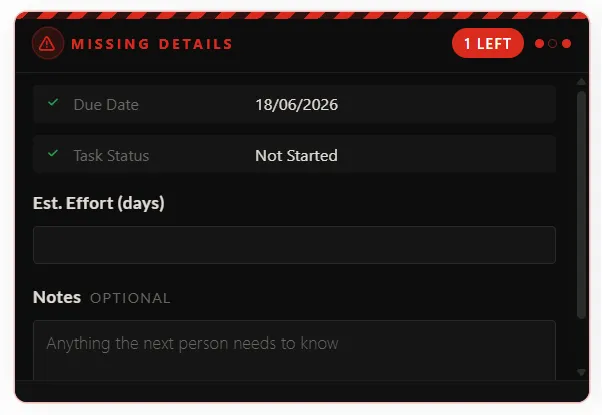
The same tile with blocking emphasis, dark theme, and stacked layout — the hazard stripe and red counter against labels sitting above their controls.
Use blocking sparingly. If everything is blocking, nothing is.
All movement stops once the form is complete, and it’s switched off entirely for anyone whose system asks for reduced motion.
Wording
| Setting | Default | Shown |
|---|---|---|
Title | Missing details | The heading while something is still missing. |
CompleteMessage | Nothing missing | The heading once everything is answered. |
Subtitle | — | An optional second line under the heading. |
Per-question options
Listed under the field name in FieldOverrides. Only override what the field’s own definition can’t already tell the tile.
| Option | Effect |
|---|---|
Required | false marks the question optional, and it never counts as missing. Defaults to true. |
Label | Reword the question, for this tile only. |
Hint | One short line beneath the control. |
Placeholder | Gray prompt text inside an empty box. |
Quick | One-tap stock answers, like ["Unknown", "Refused"], so “I don’t know” also costs a single click. Saved exactly as written, so use it only on free-text questions — never on a drop-down or person lookup, which accept known values only. |
Unit | A suffix inside a number box, such as kg or days. |
Min / Max | Limits for a number. Max also sets the number of stars on a rating, defaulting to 5. |
Control | Force a particular control instead of the one the field implies: text, longtext, number, date, choice, multichoice, boolean, rating. |
rating is only available here. There’s no rating field type, so a 1–5 star question is a number field with "Control": "rating".
Before you roll it out
- Answers save immediately. There’s no confirmation step and no undo, so this suits short, low-risk questions rather than anything that needs reviewing first.
- Permission is respected. Only people with edit rights on the record can answer. Everyone else sees the same information, read-only.
- Last answer wins. If two people have the tile open on the same record, the second answer overwrites the first. Keep forms short.
- Choose questions that are usually blank. A field that gets filled in automatically makes the tile look finished from the moment a record is created.
- “No details available for this record.” almost always means one of the record’s drop-down fields is empty. Set that field and the tile comes back. It’s a known platform limitation, tracked separately.