Overview
A Countdown Tile shows one live timer: either a countdown to a date, or the elapsed time since one. It points at a date field on an entity. The big digits tick toward that field’s value, and the footer names the entity and its type.
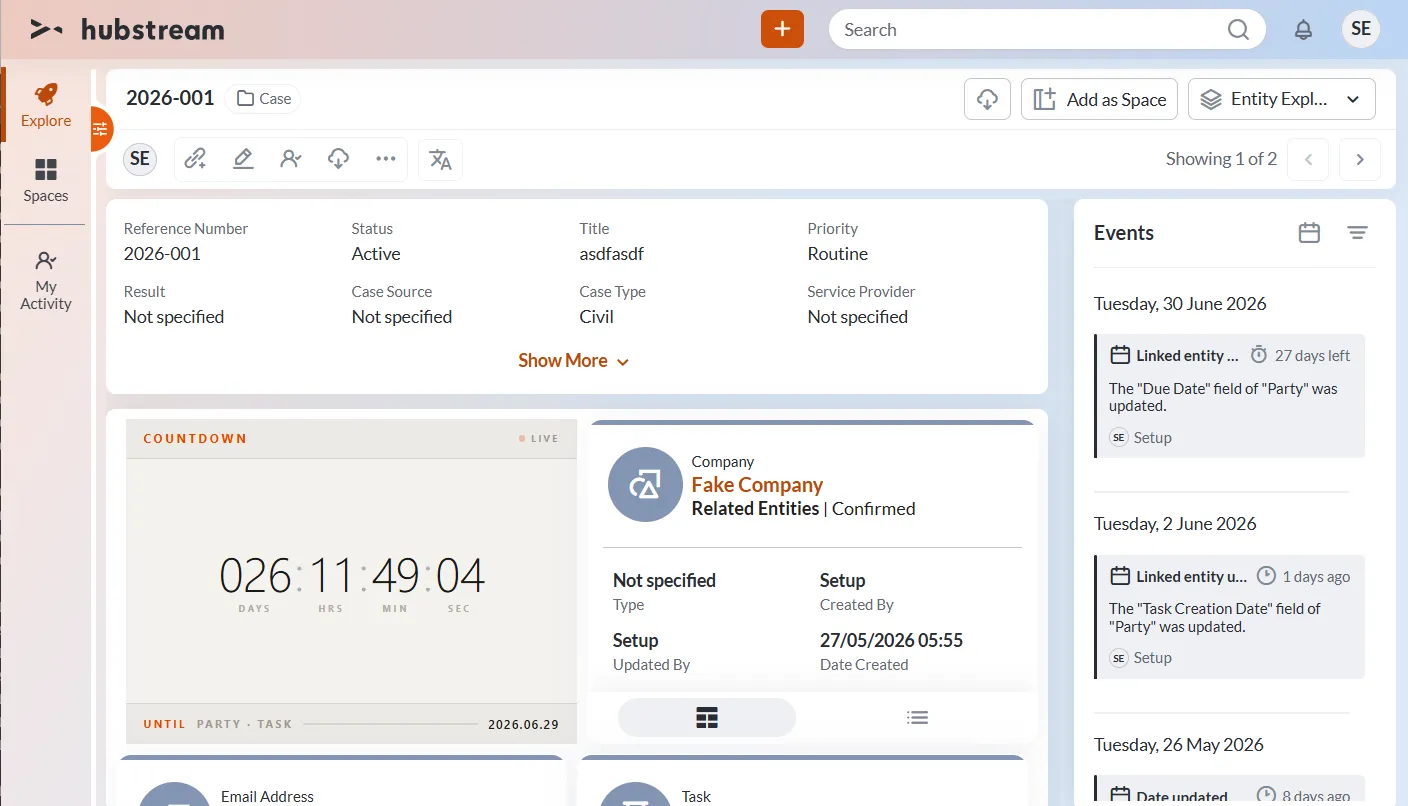
The tile in countdown mode. The footer is the default {EntityName} · {EntityTypeLabel} caption — here a task named Party — followed by the target date as {Date}.
Because the tile points at a field rather than a fixed date, it works on the entity that owns the date (a task) or on that entity’s parent (the case the task belongs to).
The tile’s Properties JSON is configured in the admin. It’s evaluated on the server, against the source entity (the one you’re on) and its closest-linked entities. If more than one date matches, Strategy picks the one to show.
The Properties shape
{
  "Type": "CountdownTileContainer",
  "Properties": {
    "Strategy":  "Soonest" | "MostRecent" | "Furthest" | "FirstMatch",
    "NameField": "Name",
    "Targets": [
      {
        "Field": "<EntityType>.<datetime field>"  |  "<datetime field>",
        "Scope": "Source" | "Closest" | "Any",
        "Mode":  "countdown" | "elapsed",
        "Label": "{EntityName} · {EntityTypeLabel}"
      }
    ]
  }
}
Strategy — which date wins
| Value | Picks | Use it for |
|---|---|---|
Soonest (default) | the nearest future date. If none are in the future, the most overdue past one, shown as OVERDUE | “the next due date” |
MostRecent | the latest past date (<= now) | “the last time this changed” |
Furthest | the latest date overall | “the final milestone or end date” |
FirstMatch | the first candidate in Targets order | one fixed target |
NameField — where {EntityName} comes from
The field that holds the entity’s display name. It defaults to Name. Change it to match your model — Title or Subject, for example.
Targets — the dates to choose from
| Key | Meaning |
|---|---|
Field | The date field. <EntityType>.<field> (e.g. Task.DueDate) applies only to that type. A bare field (e.g. ModifiedDate) applies to every type. Both parts must be exact. |
Scope | Source is the entity you’re on, Closest is the entities linked to it, Any (or leaving it out) is both. |
Mode | countdown counts down, then shows OVERDUE. elapsed counts up. |
Label | Caption template. Defaults to {EntityName} · {EntityTypeLabel}. |
Label tokens
| Token | Shows |
|---|---|
{EntityName} | the entity’s NameField value (e.g. “Renew Acme contract”) |
{EntityTypeLabel} | the type’s display label (e.g. type Investigation shows as “Case”) |
{EntityType} | the raw type name (e.g. Investigation) |
{Date} | the chosen date, formatted yyyy.MM.dd |
{Field:<column>} | any other field on the same entity (e.g. {Field:ModifiedBy}). That column is fetched for you |
How the date reaches the tile
The server sends TileInfo.Data = { TargetDate, Label, Mode }. TargetDate is ISO-8601 UTC (round-trip "o"), so the browser always parses it. The timer then ticks once a second.
Examples
An upcoming task due date
The classic countdown.
{
  "Strategy": "Soonest",
  "NameField": "Name",
  "Targets": [
    { "Field": "Task.DueDate", "Scope": "Any", "Mode": "countdown", "Label": "{EntityName} · {EntityTypeLabel}" }
  ]
}
This shows the nearest upcoming Task.DueDate on the entity you’re on or its linked tasks. Once it passes, the tile flips to OVERDUE.
The last time this changed, and who changed it
{
  "Strategy": "MostRecent",
  "Targets": [
    { "Field": "ModifiedDate", "Scope": "Any", "Mode": "elapsed", "Label": "{EntityName} · {EntityTypeLabel} — {Field:ModifiedBy}" }
  ]
}
ModifiedDate is a bare field, so it applies to every type. MostRecent picks the latest edit across the source and closest entities, and elapsed counts up from it. {Field:ModifiedBy} adds who last touched it — swap in your own audit column, such as LastModifiedBy.
Days until a case deadline
Source entity only.
{
  "Strategy": "Soonest",
  "Targets": [
    { "Field": "Investigation.DeadlineDate", "Scope": "Source", "Mode": "countdown", "Label": "{EntityName} · {EntityTypeLabel}" }
  ]
}
Contract start or renewal, whichever matters
{
  "Strategy": "Soonest",
  "Targets": [
    { "Field": "Contract.RenewalDate", "Scope": "Any", "Mode": "countdown", "Label": "Renews: {EntityName}" },
    { "Field": "Contract.StartDate",   "Scope": "Any", "Mode": "elapsed",   "Label": "Active: {EntityName}" }
  ]
}
Both dates are candidates. Soonest shows the nearest upcoming one, the renewal. If no renewal is coming up, it shows the most overdue date instead. Each target keeps its own mode and label.
Countdown to a linked meeting
{
  "Strategy": "Soonest",
  "Targets": [
    { "Field": "Appointment.StartTime", "Scope": "Closest", "Mode": "countdown", "Label": "{EntityName} · {EntityTypeLabel}" }
  ]
}
Common gotchas
- The type prefix and field name must be exact.
Case.Duedoes nothing if the type isInvestigationand the field isDueDate. UseInvestigation.DueDate. - The field must hold a date, or a string that parses as one. Anything else is skipped.
- No date means no tile. If you expect a tile and get nothing, check that a target’s
Fieldexists on an in-scope entity and has a value. Soonestshows OVERDUE when every candidate is in the past. That’s intended, so a missed date still surfaces. UseMostRecentwithelapsedfor a “time since” tile.{EntityTypeLabel}falls back to the raw type name until the metadata label accessor is confirmed on the build. See the generator’sGetEntityTypeLabelnote.