Overview
The Status Tile turns a status field into a path. You define the steps a record moves through, say which status values belong to each one, and the tile shows where the record has got to.
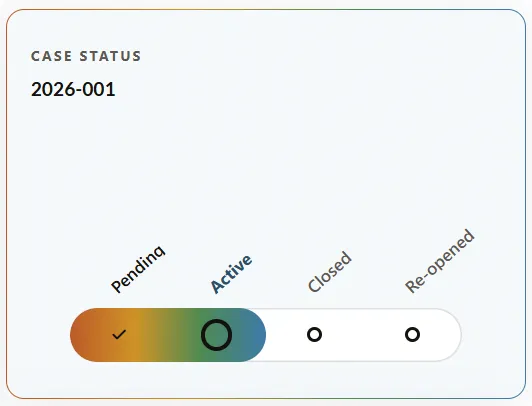
The example config below, rendered. The record name comes from ShowRecordName, the track colors from Gradient, and there’s no “you are here” marker because MarkerMode is none. Pending is done, Active is where the record is now.
How to read it
Each step shows one of a few states:
- A tick — done.
- A ring — where the record is now.
- An empty circle — still ahead.
- A dash — the step was passed over.
- A red block — the record is stuck at this step. The step’s label turns red too, and a marker names the problem.
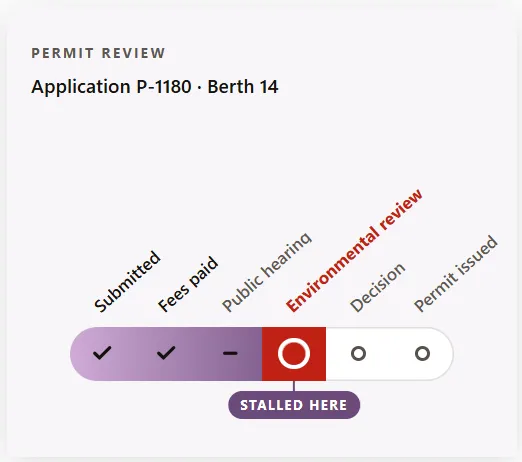
A different path, and a blocked one. Environmental review matched a blocked value, so it’s drawn red with a marker — here reworded to “Stalled here” through MarkerLabel. Public hearing shows a dash.
Example
This is what you’d enter in the admin to configure the path.
{
  "Fields": ["ID", "Name", "Status"],
  "UIProperties": {
    "EntityName": "Investigation",
    "NameColumn": "Name",
    "StatusField": "Status",
    "Steps": [
      { "Key": "Pending", "Label": "Pending" },
      { "Key": "Active", "Label": "Active", "Match": ["Active", "On Hold"], "BlockedMatch": ["On Hold"] },
      { "Key": "Closed", "Label": "Closed", "Match": ["Resolved", "Inconclusive"], "Terminal": true },
      { "Key": "Re-opened", "Label": "Re-opened", "Match": ["Re-opened"] }
    ],
    "Fill": "gradient",
    "Gradient": ["#bc5a28", "#cf9327", "#4f8a51", "#3d7aa8"],
    "Accent": "#4a7fa5",
    "MarkerMode": "none",
    "ShowDates": false,
    "ShowRecordName": true,
    "Pulse": true,
    "Theme": "light",
    "ActionMode": "none"
  },
  "StaticContent": {
    "Title": "Case status",
    "Subtitle": "",
    "MarkerLabel": "You are here",
    "CompleteMarkerLabel": "Complete",
    "NoDataMessage": "No status to show for this record.",
    "OffPathMessage": "Status \"{status}\" is not on this path.",
    "NotConfiguredMessage": "This tile is not configured correctly: {reason}"
  }
}
The record and its status
| Setting | What it does |
|---|---|
Fields | The fields the tile reads. It needs ID, the name field, and the status field. |
EntityName | The record type the tile appears on, such as Investigation. |
NameColumn | The field holding the record’s display name. Usually Name. |
StatusField | The field holding the status the path is built from. |
Steps
Steps is the path, drawn in the order you list them.
| Setting | What it does |
|---|---|
Key | Short name for the step, used internally. |
Label | The wording shown above the track. |
Match | The status values that put a record at this step. List every value that belongs here — Closed in the example matches both Resolved and Inconclusive. |
BlockedMatch | The values at this step that mean the record is stuck. These are drawn red with a marker. |
Terminal | Marks a step where the path can end. |
Two things about the example worth copying:
A blocked state isn’t a step of its own. On Hold appears in both Match and BlockedMatch on the Active step. That’s what makes it read as “at Active, but stuck” rather than as a separate stage in the workflow.
A terminal step doesn’t have to be last. Closed is terminal, but Re-opened comes after it in the list, because re-opening is what happens after a case ends.
Appearance
| Setting | Values | Effect |
|---|---|---|
Fill | gradient in the example | How the completed part of the track is filled. Other values aren’t documented yet. |
Gradient | A list of colors | The colors across the track — one per step in the example. |
Accent | A color | The accent used for the current step’s label and ring. |
MarkerMode | none hides the marker | Controls the “you are here” marker. The second screenshot shows one, so other values turn it on — those values aren’t documented yet. |
ShowDates | true, false | Whether each step carries a date. |
ShowRecordName | true, false | Whether the record’s name appears under the title. |
Pulse | true, false | A slow pulse on the current step. Set false for a calmer dashboard. |
Theme | light, dark | The card’s palette. |
ActionMode | none in the example | Its options aren’t documented yet. |
Wording
Every word the tile can say, so it can be reworded or translated without a product change. Items in braces are filled in automatically.
| Setting | Default | Where it appears |
|---|---|---|
Title | Case status | The heading. |
Subtitle | — | An optional second line. |
MarkerLabel | You are here | The marker on the current step. Reworded to “Stalled here” in the second screenshot. |
CompleteMarkerLabel | Complete | The marker once the record reaches the end. |
NoDataMessage | No status to show for this record. | When there’s no status to read. |
OffPathMessage | Status “{status}” is not on this path. | When the record’s status matches no step. |
NotConfiguredMessage | This tile is not configured correctly: {reason} | When the settings can’t be understood. |
Before you roll it out
- Match the stored values, not the display wording. A step whose
Matchvalues don’t exist will never light up. - Cover every status value you use. Anything you leave out lands off the path, and the tile says so rather than guessing — that message is there to be read, not ignored.
- List the steps in the order work happens. The path is drawn in list order, not worked out from the data.
- Keep paths short enough to read. The labels sit at an angle to fit, and six steps is already a lot of angled text.