Overview
HubstreamStickers — the Sticker Studio — is an app for making stickers, at stickers.hubstream.one. It’s public, and it signs you in with your Hubstream account.
Stickers appear throughout Hubstream on annotation layers, and they’re what the StickerBook Tile draws. Making one changes nothing in Hubstream, so it’s safe to explore first and decide where to use them later.
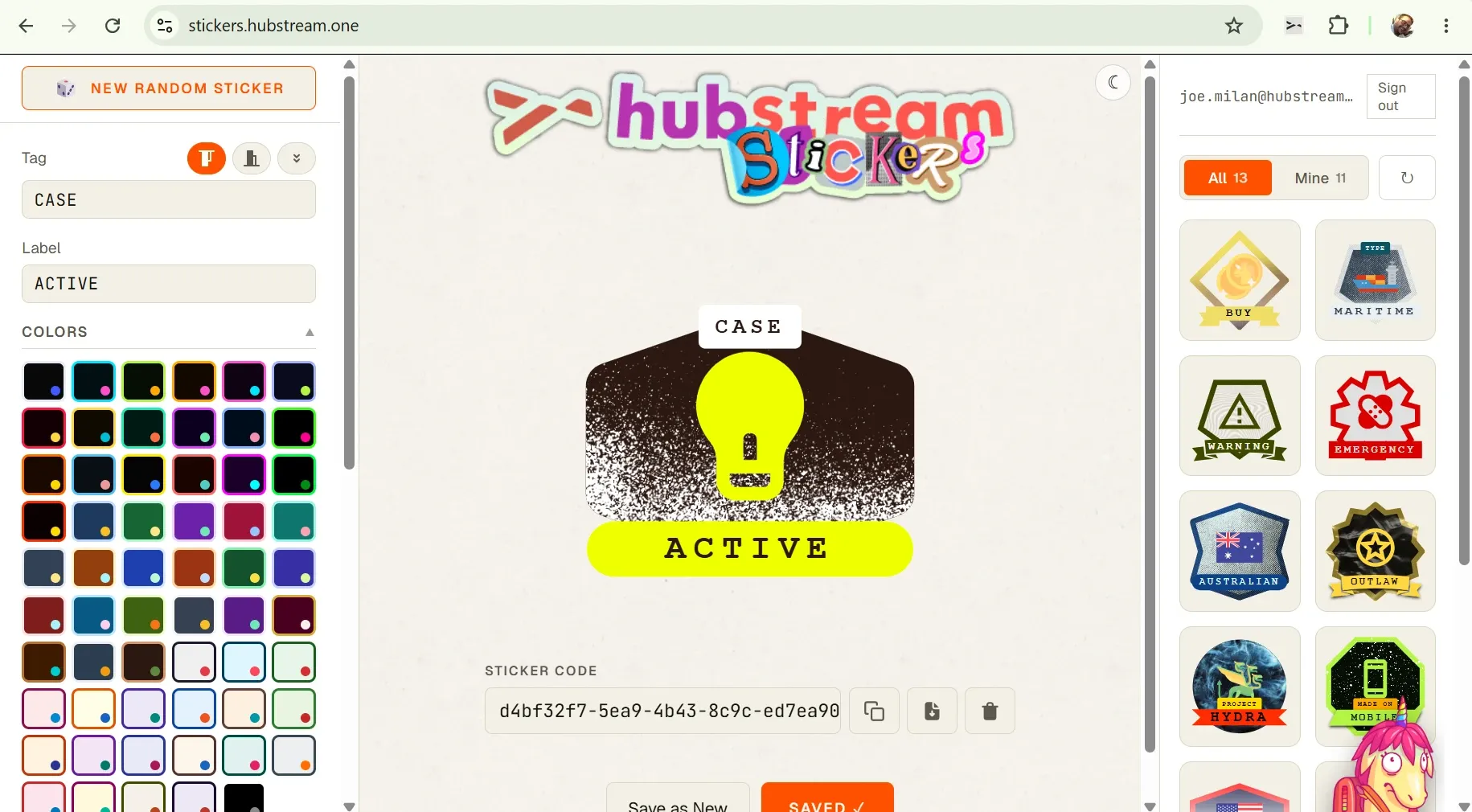
Tag and label at the top left, colors beneath them, and the sticker code below the preview — that code is what a StickerBook Tile condition points at. The shared catalog runs down the right.
Making a sticker
A sticker is a stack of choices. You can change each one on its own.
| Part | What it does |
|---|---|
| Tag | The small label across the top (e.g. CASE). |
| Label | The text in the banner below the icon (e.g. ACTIVE). |
| Colors | Ready-made color sets, or pick your own. The sets are a faster start. |
| Shape | The outline of the sticker. |
| Banner | The shape holding the label. Can be set to none. |
| Overlay | A texture — halftone, sheen, and others — that pushes the background back. Some suit a given shape and some don’t. Set it to none when it fights the icon. |
| Icon | The main element, and the thing to get right. |
Icons
The icon libraries are large and searchable. Alongside the usual sets you get abstract shapes for meanings you can’t really draw, every flag, emoji, and colored domain icons.
Black-and-white icons take your chosen colors. Colored icons keep their own and ignore your palette.
New random sticker
New random sticker rolls a whole new combination. Click through it until something looks close, then fix the icon. The icon carries most of the meaning, so it’s the part worth your time.
If the label text overlaps
Add a space either side of the text and it shrinks to fit. Long enough text starts using a second line.
Saving, updating, deleting
Save Sticker publishes the sticker definition and the image. You get back:
- a sticker code, the GUID the StickerBook Tile points at
- a public image URL
- the image itself, if you want to download it
Save as New keeps the original and publishes your changes separately. Update regenerates the sticker in place, so anything pointing at that code picks up the new artwork. Delete works only if you own the sticker and you’re signed in.
Images are cached. If an updated sticker still looks old, empty the cache.
The shared catalog
Every sticker anyone makes shows up in the catalog, whoever owns it. Designers, PMs, and CSMs can share stickers with no handoff: make one, and everyone has it.
The catalog is filterable and describes each sticker, which also makes it usable by an LLM. Given a big enough library, a model can pick a reasonable sticker for a rule on its own. A filterable catalog URL exists for that.
Using a sticker in Hubstream
Copy the sticker code and point a StickerBook Tile condition at it. See StickerBook Tile for the rule syntax and layout options.