Retrieve form metadata required for creating a new entity in an entity type. This endpoint returns the structure of the form used to create a new entity, including field definitions.
HTTP Method
POST
Endpoint
/api/engine/forms/runRequest URL
{Base URL}/api/engine/forms/runRequest Body
{
  "EntityName": "Investigation",
  "Type": "New"
}
Parameters
| Param Name | Data Type | Description |
|---|---|---|
| EntityName | String | Name of the entity type (for example, Investigation). |
| Type | String | Form type. Use New to initialize a form for creating a new entity. |
Curl Example
Multi-line format (for readability)
curl --header "Accept-Language: en" \
     --http1.1 \
     --insecure \
     --verbose \
     --ntlm \
     --user "device-name1\jdoe:P@ssw0rd" \
     -X POST \
     "https://hubstreamproduction.hubstreamonline.com/api/engine/forms/run" \
     -H "Content-Type: application/json" \
     -d '{
       "EntityName": "Investigation",
       "Type": "New"
     }'
Single-line format (for terminal use)
curl --header "Accept-Language: en" --http1.1 --insecure --verbose --ntlm --user "device-name1\jdoe:P@ssw0rd" -X POST "https://hubstreamproduction.hubstreamonline.com/api/engine/forms/run" -H "Content-Type: application/json" -d "{\"EntityName\":\"Investigation\",\"Type\":\"New\"}"Responses
Status code 2XX indicates a successful request and response.
200 OK
Description: Operation succeeded.
Response JSON:
The response includes:
- Field name (for example, Title, Status)
- Field types (for example, TextBox, Dropdown)
- Entity information
- Relationship information (linked entities)
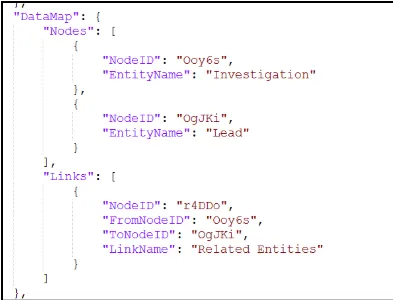
If multiple entities are present:
- The primary entity (for example, Investigation) acts as the parent entity
- Linked entities (for example, Lead) act as child entities