Overview
The Marquee Tile shows a short, prominent message on an Entity Explorer page. Conditions decide which message appears. They’re checked against the entity you’re on and the entities linked to it, using the same rules as other tiles.
Every condition that matches adds its Text. The matching texts are joined into one line with | and shown under a MESSAGE header. Conditions that don’t match add nothing.
The Marquee Tile used to be the Hello World Tile, and the container type was renamed with it. Older setups using HelloWorldTileContainer describe this same tile, but their Type needs updating to MarqueeTileContainer.
The Properties shape
The tile’s Properties JSON is configured in the admin.
{
  "Type": "MarqueeTileContainer",
  "Properties": {
    "Conditions": [
      {
        "Field": "EntityType" | "<EntityType>.<field>",
        "FilterType": "Partial",
        "Comparison": "Equals" | "NotEquals",
        "Value": "<value to test against>",
        "Text": "<message this condition adds when it matches>"
      }
    ]
  }
}
Conditions
| Key | Meaning |
|---|---|
Field | What to test. EntityType checks whether an entity of that type is in scope. <EntityType>.<field> (e.g. EmailAddress.Name) checks a field value, and that column is fetched for you. |
FilterType | How the value is matched. It comes from the shared tile rules; the example below uses Partial. |
Comparison | How to test Value — Equals or NotEquals. |
Value | The value to compare against. It must match your model exactly. |
Text | The message this condition adds when it matches. |
Example
Three conditions: one type check that fails, one that matches, and one field check.
{
  "Type": "MarqueeTileContainer",
  "Properties": {
    "Conditions": [
      {
        "Field": "EntityType",
        "FilterType": "Partial",
        "Comparison": "Equals",
        "Value": "CompanyFALSE",
        "Text": "There is a company in this investigation"
      },
      {
        "Field": "EntityType",
        "FilterType": "Partial",
        "Comparison": "Equals",
        "Value": "EmailAddress",
        "Text": "There is an Email Address"
      },
      {
        "Field": "EmailAddress.Name",
        "FilterType": "Partial",
        "Comparison": "NotEquals",
        "Value": "gmail",
        "Text": "not a gmail"
      }
    ]
  }
}
On a case with a linked email address that isn’t a Gmail account, you get:
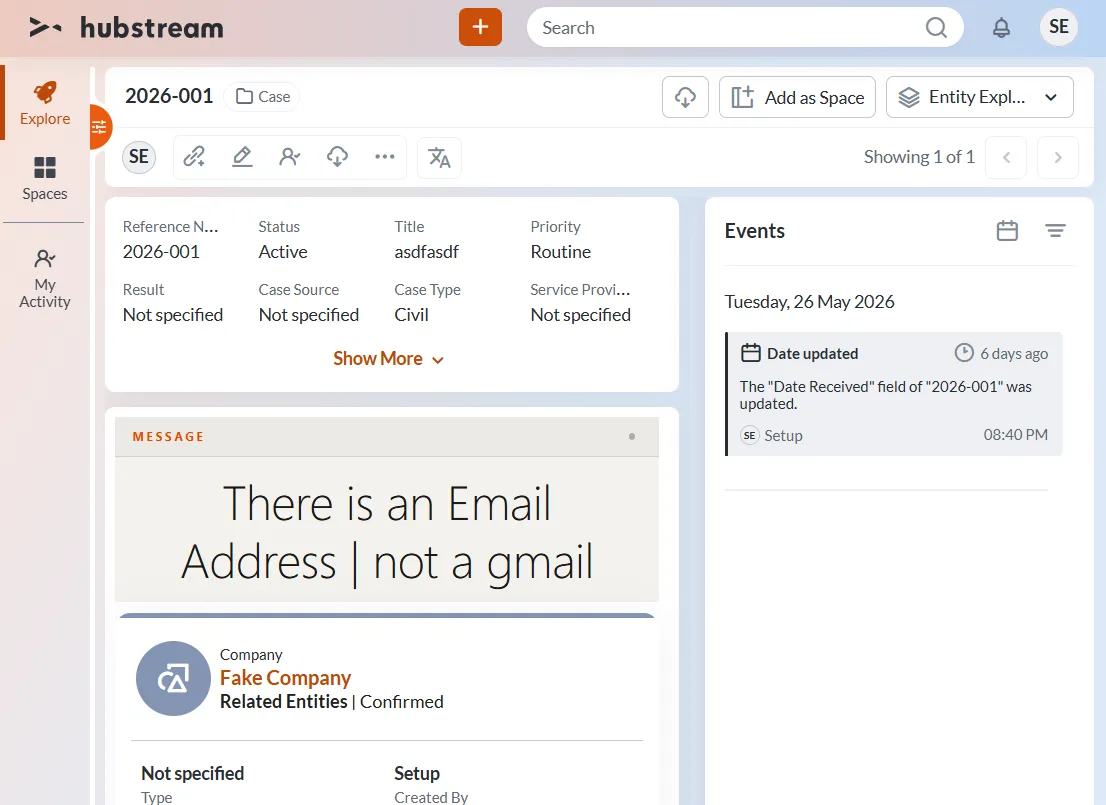
Two of the three conditions matched, and their texts are joined with a pipe into one line. The CompanyFALSE condition added nothing.
The first condition drops out because nothing in scope is a CompanyFALSE — no such type exists. A condition that doesn’t match simply adds nothing. It isn’t an error.
Common gotchas
- Type names must be exact.
CompanyFALSEmatches nothing, because the type isCompany. A misspelled type fails quietly. - Field conditions need the type prefix. Use
EmailAddress.Name, notName, so the right column gets fetched. - Messages add up. Every match adds its text, so a broad rule set makes a long line. Keep each
Textshort.