🧪 Experimental feature (preview). This feature is under active development and released early so you can try it and give feedback. Behaviour, options, and results can change without notice, and it isn’t covered by the usual support and stability guarantees. Avoid relying on it for production work.
🚧 Not yet live (coming soon). Settings View isn’t available yet. It’s documented ahead of release, so what’s described below can still change before it ships.
Overview
Hubstream decides which visualizations to offer, which one to promote, and which tiles to show by running rules against the page you are looking at. Normally that decision is invisible: a view is in the switcher or it isn’t. Settings View makes the decision visible. Pick it from the view switcher on any list, and it explains, rule by rule and condition by condition, why this page looks the way it does.
Everything it shows is filtered by the page you opened it from: a strip at the top names that page’s entity and result count, and every verdict below is judged against them. Open it from a different list and you get that list’s answers. The exception is the install-wide layers on the Settings pane (model settings, config, environment), which are labelled as such.
It is a window, not a builder. Nothing on it can be edited, and it never writes anything. Rules, the Pagescape Library, and settings are still changed where they always were, in the admin area; this view tells you what those changes did.
The four panes
Context explains the page itself, because every verdict below depends on it: the entity types in the query, the total result count, the current layout, the entity settings that rules actually read, derived from the rules themselves with a count of how many read each one, and a field profile (value-list, multiline and promoted field counts). A table at the bottom lists every condition type a rule can ask about and the value it sees here, so you can predict a rule’s outcome before you open it.
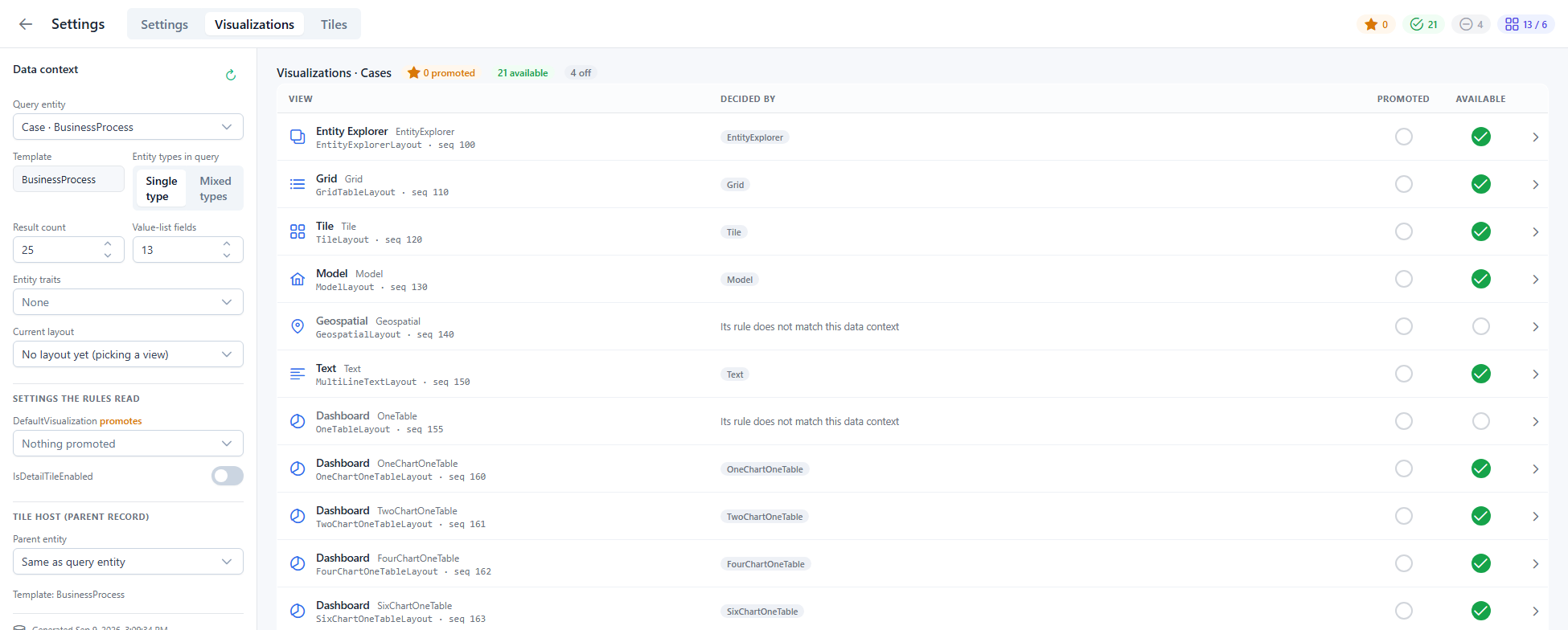
Visualizations lists every entry in the Pagescape Library, plus any custom dashboards, with two marks per row:
| Column | Meaning |
|---|---|
| Recommended | A rule matches this page, so the switcher lists the view at the top. Views that are on but don’t match sit behind the switcher’s collapsed More toggle, as compact one-line cards, and say so here. |
| Opens first | The recommended view with the lowest library sequence. This is what a fresh list of these records opens in. |
Two things the switcher does after the rules run are shown too. The six built-in Dashboard layouts are one card in the switcher, so they are one row here, led by the layout the switcher actually shows and tagged 6 layouts · 1 shown; its Decided by cell says why that layout won (it is the page’s current layout, the query mixes entity types, or it simply came first in rule order). Expand the row to see every layout, the rule that qualified it, and whether it was folded into the shown one. A custom dashboard is its own row, because it is its own card: it appears only when its own rule matches, and it is never listed under more.
Click a row to open the rules that name that view. Each rule shows its conditions as a sentence — Query Entity Template is one of BusinessProcess, Subject — followed by the value this page has, with a tick or a cross. A disabled rule, or one excluded for this entity by an admin, is shown struck through so you can see it exists without wondering why it has no effect.
Tiles does the same for tile rules, grouped by scope (Insight tiles and Tile-view tiles). Because tiles live on a record’s page, they are assessed as if one of the listed records were open. Each tile row says what it renders as (its tile type, and the extensible tile type when it has one).
Settings shows four layers, each with a filter box across all of them: the current entity’s settings, the install-wide model settings, the config this browser session actually runs with (marked server when it arrived from the model, client default when the browser fell back to its own value), and the instance’s environment settings. Every row carries its definition — group and description — where one exists.
What it reads
Settings View reads the same admin data the rules engine is compiled from: the rule definitions with their conditions and results, rule exclusions, the Pagescape Library, entity settings, model settings, and setting definitions. It fetches these once when the view opens, through the standard expression API, and evaluates the rules in the browser against the page’s context. If one of those reads fails, the view says which one at the top and renders everything else.
Known limitations
- Traits aren’t modelled. The browser doesn’t know an entity’s traits, so conditions on Query Entity Trait or Parent Entity Trait show as not modelled rather than pass or fail. A rule that depends on one is reported as not matching here even though the server may match it.
- The browser’s verdict is a prediction. It mirrors the server’s rule engine but is not the engine. Async conditions and field-filter conditions in particular are judged only by the facts the page exposes.
- Multi-entity queries use the first entity type for settings and field counts.